
Video content creation has become one of the fastest-growing industries in the digital world. Millions of creators upload short videos, cinematic edits, gaming clips, tutorials, vlogs, and reels every day on platforms like TikTok, Instagram, YouTube Shorts, and Facebook. Because of this massive growth, Android video editing apps have improved significantly over the last few years.
Modern mobile editing apps now include professional tools like AI effects, cinematic transitions, keyframe animations, background removal, motion blur, color grading, and high-quality exports. Features that previously required expensive desktop software are now available directly on Android smartphones.
Whether you are a beginner trying to create social media content or an experienced editor producing cinematic videos, choosing the right editing app can dramatically improve your workflow and content quality. In this article, we explore the best video editing apps for Android in 2026 and explain why they are trending among creators worldwide.
1. CapCut

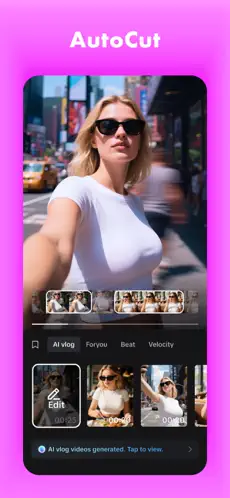


CapCut is currently one of the most popular video editing apps in the world. Developed by ByteDance, the company behind TikTok, the app has become extremely popular among content creators because of its powerful editing tools and simple user interface.
The app allows users to edit videos quickly using professional transitions, filters, AI captions, cinematic effects, motion blur, overlays, and animations. One of the biggest reasons behind CapCut’s popularity is its ability to simplify complex editing tasks using AI-powered tools and templates.
Creators can easily produce professional-looking reels and short videos without having advanced editing knowledge. The built-in templates make editing even faster by automatically applying effects, transitions, and music synchronization.
CapCut also includes advanced features like keyframe animations, background removal, object tracking, speed ramping, and beat synchronization. These features help creators produce highly engaging and visually attractive videos for social media platforms.
Another major advantage of CapCut is its huge collection of trending effects and templates. Since TikTok trends change rapidly, CapCut frequently updates its library with new transitions, animations, and filters that match current editing styles.
CapCut combines beginner-friendly editing with professional-quality tools, making it one of the best all-round video editing apps available for Android creators.
2. VN Video Editor


VN Video Editor has become a favorite choice among creators who want professional editing tools with a clean and simple interface. Unlike many editing apps that focus only on quick social media edits, VN provides detailed timeline editing features similar to desktop editing software.
The app supports multi-layer editing, advanced transitions, cinematic filters, subtitle tools, audio synchronization, and smooth motion effects. This makes VN highly suitable for vloggers, travel creators, cinematic editors, and YouTubers.
One of the strongest features of VN Video Editor is its timeline editing system. Users can work with multiple layers and precisely control transitions, animations, audio tracks, and visual effects. This level of control helps creators produce highly polished videos directly from Android devices.
VN is also popular because of its smooth performance and minimal interface design. The app avoids unnecessary clutter and focuses on providing a clean editing experience that feels professional yet easy to understand.
Creators who want aesthetic edits, smooth transitions, and cinematic color grading often prefer VN because of its flexibility and high-quality exports.
VN Video Editor is one of the best Android editing apps for creators who want professional editing controls without complicated software.
3. KineMaster


KineMaster has been one of the leading Android video editing apps for many years. It is widely known for offering professional-level editing features while remaining accessible to mobile users.
The app supports multiple video layers, transitions, effects, stickers, chroma key editing, voiceovers, and advanced audio controls. These tools make it highly suitable for YouTube creators and users who need detailed editing capabilities.
KineMaster’s chroma key feature is especially popular because it allows users to create green screen videos directly on Android devices. This feature is widely used for reaction videos, gaming edits, educational content, and cinematic projects.
The app also includes a large library of effects, transitions, music, and visual assets that help creators enhance their videos quickly.
Although the interface is more advanced compared to beginner-friendly editors, KineMaster provides powerful editing flexibility for creators who want professional control over their projects.
4. Alight Motion
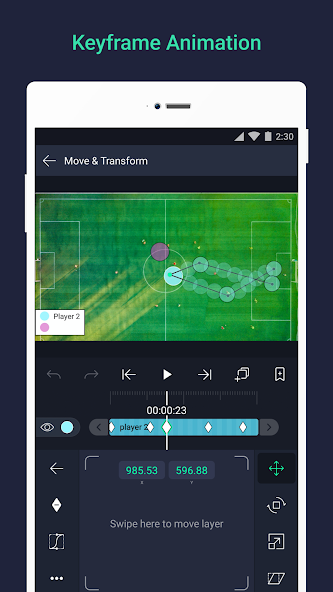
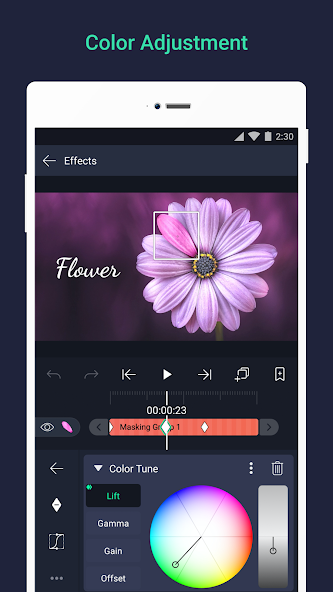
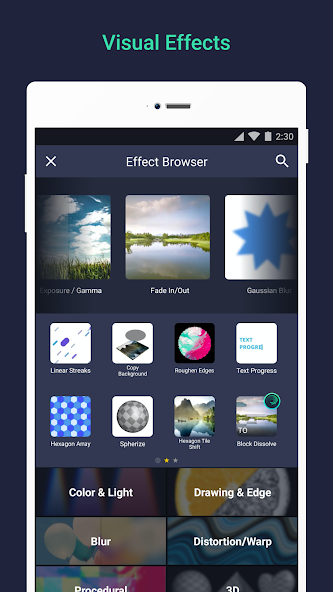


Alight Motion is one of the most advanced motion graphics and animation apps available for Android. The app is widely used for anime edits, velocity edits, cinematic animations, and visual effects content.
Unlike basic editing apps, Alight Motion focuses heavily on motion graphics and animation tools. It supports keyframe animations, blending modes, visual effects, vector graphics, and motion blur.
These advanced features allow creators to produce highly dynamic edits with smooth transitions and professional animations. Because of this flexibility, many advanced editors prefer Alight Motion for creative editing projects.
Although the app has a steeper learning curve compared to beginner-friendly editors, the results can look extremely professional when used correctly.
Alight Motion gives Android creators access to powerful animation and motion graphics tools that were previously available only on desktop software.
| App | Best For | Difficulty | Top Feature | Export Quality |
|---|---|---|---|---|
| CapCut | Reels & TikTok | Easy | AI Editing Tools | 4K HD |
| VN Editor | Cinematic Videos | Medium | Multi-Layer Timeline | High Quality |
| KineMaster | YouTube Editing | Advanced | Chroma Key | 4K Export |
| Alight Motion | Motion Graphics | Advanced | Keyframe Animation | Professional |
Final Thoughts
Android video editing apps have evolved tremendously in recent years. Modern creators can now edit professional-quality videos directly from smartphones without requiring expensive computers or advanced software.
CapCut, VN Video Editor, KineMaster, and Alight Motion continue to dominate the mobile editing industry because of their powerful features and flexibility.
Choosing the best editing app depends on your content style and editing needs. Beginners may prefer simple apps like CapCut, while advanced creators may benefit more from VN Video Editor or Alight Motion.